Garage guide for version 0.6.x
Best PolyTrack Car Design Ideas
A good PolyTrack car design is easy to recognize at racing speed. Use one dominant color, one sharp accent, and a wheel or exhaust choice that supports the same visual direction instead of competing with it.
Quick answer
What makes the best PolyTrack car design?
The best PolyTrack car design is not necessarily the most complicated one. It is a design you can identify immediately when the camera pulls back, the track changes color, or several customized cars share the same corner. High contrast and a controlled palette usually work better than five equally loud colors.
Start with a base color that covers most of the body. Add one accent that is clearly lighter, darker, warmer, or cooler. Then decide whether the pattern, rims, and exhaust repeat the accent or stay neutral. Test the car on a bright track and a shadowed track before saving the profile.
Car customization arrived with the official 0.6.0 update. The current creator-owned itch.io release was verified as 0.6.2 on July 16, 2026, so this guide describes the current 0.6.x garage rather than older mirrors that may not include the same options.
Build the visual system
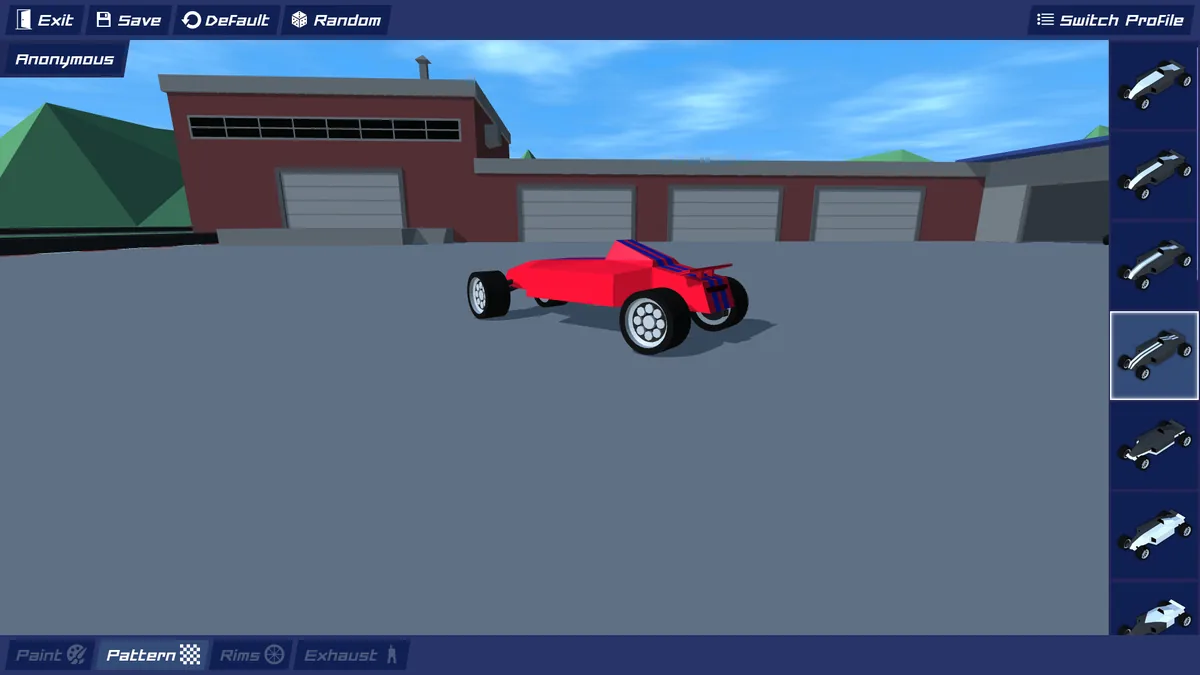
PolyTrack car customization parts explained
Treat every option as part of one design system. A strong result gives each part a role instead of choosing every setting independently.
| Garage part | What it changes | Useful design rule |
|---|---|---|
| Paint | Creates the dominant body color and the first impression. | Choose a base that remains visible against snow, sand, grey roads, and blue sky. |
| Pattern | Adds stripes, blocks, checks, or contrast areas. | Use a pattern to direct the eye, not to cover every surface with equal detail. |
| Rims | Changes the wheel color and edge contrast. | Match the accent color for a coordinated look or use a neutral rim to calm a busy body. |
| Exhaust | Adds a smaller rear detail visible in garage and close racing views. | Keep this secondary; it should support the silhouette rather than become the only focal point. |
| Profile | Saves a complete combination for later use. | Keep separate profiles for bright tracks, dark tracks, and multiplayer identity colors. |
Four practical recipes
PolyTrack car designs you can adapt
These are design directions, not exact codes. Pick one logic and adjust the colors to your taste while preserving contrast and hierarchy.
High-contrast racer
Use a dark navy, charcoal, or deep purple body with a bright cyan, lime, yellow, or white accent. Repeat the accent on the rims and keep the exhaust dark. The result reads quickly at high speed.
Best for: multiplayer races, dark tracks, and clear screenshots
Low-poly retro
Pair two neighboring warm colors such as orange and red, then add cream or white as a small highlight. Geometric patterns suit PolyTrack's angular world without looking disconnected from the game.
Best for: desert tracks, warm scenes, and a classic arcade mood
Monochrome minimal
Choose black, white, or grey for most surfaces and use only one colored detail. This is easy to keep coherent, but the accent must be strong enough to prevent the car from disappearing into pale or dark scenery.
Best for: clean profiles, time trials, and players who dislike visual noise
Multiplayer identity
Choose an unusual accent pair that your friends do not use. Make the top and rear easy to identify because those areas remain visible when several cars overlap or when the camera sits behind the pack.
Best for: friend lobbies, team colors, and recognizing your car in traffic
Step by step
How to customize a car in PolyTrack
The exact menu wording can change between builds, but the design process stays reliable across the official 0.6.x garage.
Open the garage or profile area
Use the current official build when possible. Older embedded mirrors may predate the 0.6.0 customization system or expose fewer options.
Choose the main body color first
Do not begin with rims or exhaust. The body occupies the largest area and determines which accents will remain readable.
Add one pattern and one accent
Select a pattern that preserves large readable shapes. Reuse the accent on one or two smaller parts rather than introducing several unrelated colors.
Test the car outside the garage
Run a bright track and a darker track. Check the car at speed, from behind, and against other players instead of judging only the close garage preview.
Save a named profile
Keep the successful combination and create a second version only when it has a clear job, such as snow visibility or a friend-lobby team color.
Visibility matters
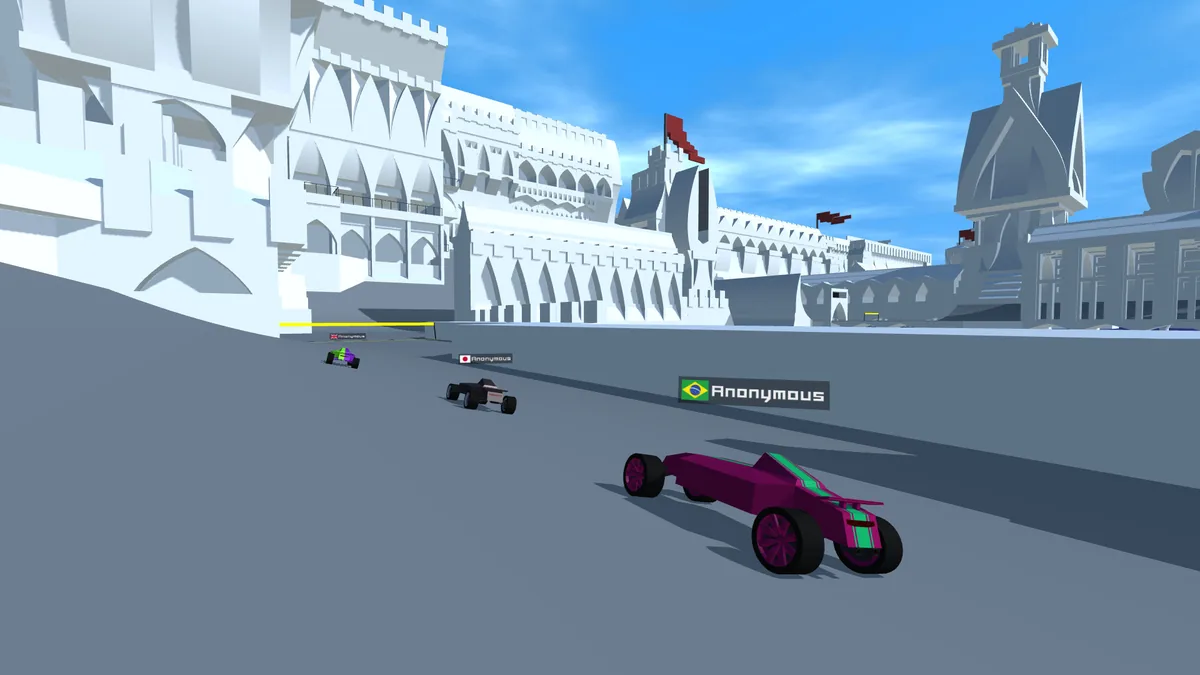
Test car designs in a real race view
Garage lighting is stable and the car fills much of the screen. Racing is harder: the car becomes smaller, motion reduces detail, scenery changes quickly, and another vehicle may cover part of the silhouette. A design that only works in the garage is unfinished.
Look for separation between body and road, body and sky, and base color and accent. If the pattern disappears at a distance, simplify it. If the rims attract more attention than the body, reduce their contrast. If the whole car blends into a snowy or sandy level, save an alternate profile with a darker base.
Official feature context
Watch the 0.6.0 customization update
This official update video is included because it directly demonstrates the release that introduced multiplayer and car customization. It is more useful here than a generic gameplay trailer.
Source: Kodub's official PolyTrack 0.6.0 devlog and linked YouTube video.
Avoid these problems
Common PolyTrack car design mistakes
Too many equal colors
When every color demands attention, the car loses a clear identity. Give one color most of the surface and let the others support it.
Judging only in the garage
A close preview hides distance and motion problems. Always run at least one lap before deciding that a design is finished.
Copying a design without adapting it
A popular palette may blend into your favorite track or match another player. Keep the design logic but adjust the values for your use.
Confusing style with performance
Customization changes appearance, not driving skill. Better contrast can help recognition, but it does not replace braking points, clean lines, or practice.
FAQ
PolyTrack car design FAQ
What is the best PolyTrack car design?
The best design is a readable one: one dominant body color, one contrasting accent, and coordinated rims or exhaust details. It should remain recognizable on bright and dark tracks.
How do I customize my car in PolyTrack?
Open the garage or profile area in an official 0.6.x build, choose paint and pattern settings, adjust rims and exhaust details, test the result on a track, and save the profile.
Which PolyTrack version added car customization?
Kodub introduced car customization with the official 0.6.0 update. The creator-owned itch.io release was verified as version 0.6.2 on July 16, 2026.
Do PolyTrack car designs make the car faster?
No. Paint, patterns, rims, and exhaust choices are visual. A high-contrast design may be easier to recognize, but speed still depends on driving and the active game build.
Why can I not see the garage options?
You may be using an older mirror or embedded build. Compare the version with Kodub's official itch.io page and avoid downloading an unknown package just to unlock customization.
Can I save more than one car style?
The 0.6.x garage includes profile controls. Use separate profiles for different visibility needs or multiplayer identities when the active build supports them.